
New Delhi, India | February 11, 2026
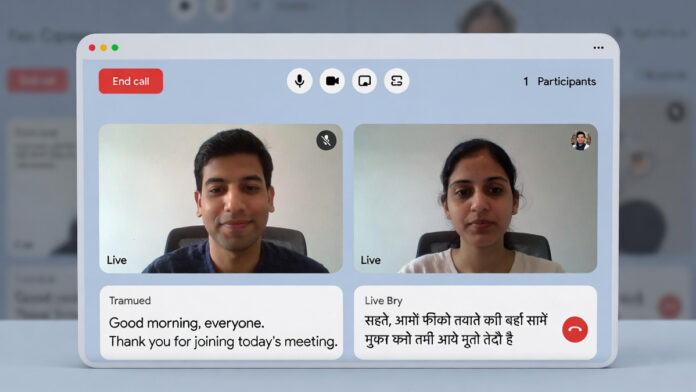
Google has introduced a new AI-powered real-time translation feature designed specifically for Indian languages, enabling live translation during video calls. The feature is being rolled out on Google Meet, aiming to reduce language barriers in one of the world’s most linguistically diverse countries.
The announcement marks a significant step in expanding AI-driven accessibility tools for users across India.
Key Features of the New AI Translation Tool
Support for 12 Indian Languages
The tool supports major regional languages, including Hindi, Bengali, Telugu, Marathi, Tamil, Gujarati, Kannada, Malayalam, Punjabi, and others. Google has indicated that additional languages may be added in future updates.
Real-Time Captioning
During a video call, when a participant speaks in their native language, translated captions automatically appear on-screen in the selected language. The translation happens in real time, enabling smoother communication without switching apps or using third-party tools.
Google Meet Integration
The feature is integrated directly into Google Meet, making it accessible for both professional meetings and personal calls. Users with Google Workspace accounts and eligible personal accounts can enable the feature through the Captions settings.
Potential Impact Across Sectors
Business and Freelancing
The tool is expected to benefit small business owners and freelancers who work across different states. For example, a trader in southern India can communicate with clients in northern India without language constraints.
Education
Students in rural or regional areas may be able to attend online sessions conducted in other languages while following translated captions in their native tongue.
Government and Administration
Officials working across states may find it easier to coordinate and communicate with citizens in different regional languages.
How to Use the Feature
The update is being rolled out gradually. To enable the feature:
Open Google Meet.
Go to Settings.
Select the “Captions” option.
Choose your preferred translation language.
Availability may vary depending on account type and region.
Expanding AI Accessibility in India
India is home to hundreds of spoken languages, making communication across regions complex. By integrating AI-powered translation directly into video conferencing, Google is positioning the feature as a practical solution for multilingual communication.
Further details, including the full list of supported languages, are expected as the rollout expands.