


6 Benefits Of Using A YouTube Thumbnail Maker For Beauty Tutorial Channels
January 30, 2026 | by INVC Desk
New Delhi, India — January 30, 2026
The secret of beautiful content? People don’t stumble upon it accidentally. They click on it because something catches their attention, making them pause from scrolling down. For makeup artists, skin and makeup tutorials, and makeup YouTubers, thumbnails are no longer just embellishments—they are a decisive factor. It’s at this point that a YouTube thumbnail maker becomes a best-kept secret weapon, and when combined with Dreamina’s creative panel, it becomes a powerhouse that changes how makeup tutorials are spotted and clicked on. Let’s dissect how this is possible.
Why beauty thumbnails are the real first impression
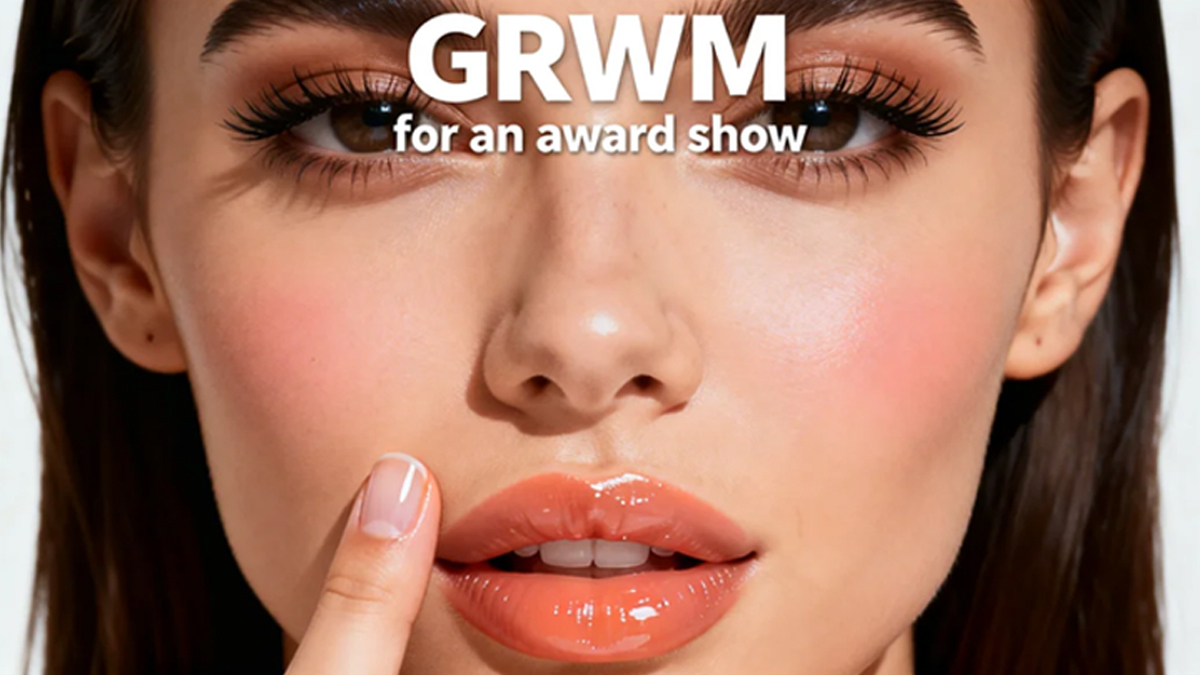
Beauty audiences are more visually trained: skin texture, lash definition, lip gradients, and color payoff are all noticed in less than a second. And a strong thumbnail doesn’t just show a face; it promises an outcome. When creators design thumbnails with intention, they’re answering one clear, unspoken question: “Is this video going to make me look like that?”
Makeup creators often rely on cropped eyes, half-face comparisons, or extreme before–after contrasts. Skincare vloggers zoom into glow, pores, or redness. Hair and beauty reviewers highlight shine, curls, or frizz control. Well-crafted thumbnails tell the viewer exactly what transformation to expect, without a word.
Click-through rates love confidence, not clutter
Beauty thumbnails work best when they’re decisive. One expression. One focal feature. One promise.
The creators who make the most out of using thumbnail tools can:
-
Direct the selection of bold, contrasting facial expressions to match the video outcome: shock, glow, satisfaction
-
Crop in tightly to eliminate background distractions
-
Use contrast to make skin tones, blush, or eye looks pop
This clarity builds instant trust. Viewers don’t have to guess what the video is about; they feel it.
Close-ups turn tutorials into proof
In beauty, proof is always stronger than persuasion. The close-ups in thumbnails work as mini-trials about evidence. Emphasizing eyeliner symmetry and glass skin texture quality conveys expertise.
When artists enhance thumbnails with smart tools, details, no matter how fine, become prominent. Methods such as image upscale can be used to sharpen the lash, brow, or skin finish to make the thumbnail clear on large screens without appearing grainy. The aim here is to make the thumbnail look as polished as the tutorial.
When artists enhance thumbnails with smart tools, details, no matter how fine, become prominent. Methods such as image upscale can be used to sharpen the lash, brow, or skin finish to make the thumbnail clear on large screens without appearing grainy. The aim here is to make the thumbnail look as polished as the tutorial.
Visual consistency establishes a recognizable beauty brand
Notice how there are beauty channels you can recognize even without reading the title? That would be the effect of ‘thumbnail language’ in action.
Consistency: Angle, lighting treatment, face framing—these make it memorable. Gradually, audiences link that look to quality. A thumbnail generator ensures that you establish:
-
Signature crop (eyes only, half face, three-quarter
-
A repeating color scheme
-
A discernible editing style
This consistency does not limit content creators; it allows them to have a visualization that grows with their channel.
Emotion sells the result before the video starts
Beauty is an emotional thing. Confidence, excitement, relief, surprise—are all click-generating emotions.
The thumbnails that perform well usually include:
-
Eye contact for connection
-
Expressions that exaggerate the tutorial outcome
-
Body Language that feels personal, not posed
Where instead of “watch me do my makeup,” it will say “This will work for you too.” This emotional transition from scrolling to watching is where conversions happen.
Static beauty to dynamic storytelling
The beauty artists today also leverage Dreamina’s AI capabilities to enlarge their thumbnail ideas into possible high-quality images of reality. The pictures assist in visualizing how the final makeup or skin glow or even facial expressions must appear in an edited environment. After deciding on an image concept, it becomes possible to develop it into preview videos or talking visuals in an avatar form using image-based inputs to examine storytelling possibilities rather than having to shoot them directly.
At this stage, experimentation can prove its strength. Based on the moral usage of a deepfake AI tool, beautycare artists can mimic a facial feature or expression on a static image and then reproduce it on a video preview for testing purposes later on.
The process is entirely about developing visual content based on a command or a reference image, without relating to animation concepts or motion effects at all.
Thumbnails as silent teachers
Beautiful thumbnail images not only entice people to click on them, they can teach a great deal about beauty at a single glance. A photograph can demonstrate the following
-
Where product is applied
-
The extent of coverage
-
Before and after In beginner-friendly content, this clarity helps to overcome intimidation.
For an audience who is advanced, this indicates technique. In either case, the thumbnail begins the teaching before the video has even loaded.
Dreamina’s 3-step flow for creating beauty thumbnails
Making beauty thumbnails shouldn’t be a stressful or complex process. This is because Dreamina makes it intuitive, visually oriented, and essentially friendly to content creators, especially beauty makeup artists. This is because there are three steps that you can follow to create your beauty thumbnail.
Step 1: Formulate the text prompt
Go to Dreamina and create a full-text message as your dream thumbnail description. This description should include your ideal beauty thumbnail image details. Some of the aspects you should consider include facial expression, type of cosmetics used, lighting effects, orientation of the camera, and the mood.
Example prompt: Create a YouTube thumbnail of a close-up beauty thumb of a young woman, dewy glass skin, pale peach blush, wet lips, and thick lashes. Bare background, high studio lighting, bravura portrait expression, head and neck cropped from forehead to chin, high contrast, fashion beauty portrait photography, and write “GRWM for an award show.“
The more particular your description, the better your search result will reflect your vision.
Step 2: Adjust parameters and generate
Second, you have to fine-tune your technical options. Choose your favorite model, set an aspect ratio suited for YouTube, determine the size, and then assign your resolution, which could be 1k or 2k based on your desired level of image definition. After everything appears set, click the generate icon under Dreamina to allow the system to realize your task.
Step 3: Adapt and download
With Dreamina, after generation, you can further enhance an image by leveraging AI-powered customization options for inpainting makeup details, expanding the frame for better composition, removing distractions, and even retouching for a professional finish. When satisfied, click the icon labeled “Download” to save your thumbnail in preparation for upload.
Beauty clicks are built, not hoped for
In a cluttered beauty space, a thumbnail is a silent pitch. Before the title, before the algorithm, and before loyalty speaks, it speaks. By using tools like Dreamina, creators can take that skill and translate it into attention-screaming visuals with no need for extensive design knowledge.
Whether it is your first tutorial or you perfect an entire channel, these thoughtful thumbnails turn the casual browser into a very interested one. And when your visuals finally match your talent, the clicks follow.
RELATED POSTS
View all


North India Freezes Under Severe Cold Wave: Dense Fog, Sub-Zero Temperatures Disrupt Daily Life Today
January 19, 2026 | by INVC Desk
Rain & Thunderstorm Alert Across North India as Western Disturbance Becomes Active
March 18, 2026 | by INVC Desk

US to Mandate Social Media Vetting for All Tourist Visas in 2026, Citing “Ideological Threats”
December 11, 2025 | by INVC Desk